2.2.2. List of variable information
We will present in this section the list of information contained in a TAttribute of Uranie.
Figure 2.2 Attributes of TAttribute class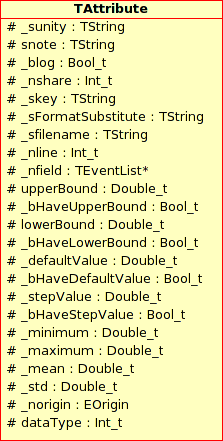
- Name: Variable name
It should be a short name as this information is needed to use this variable (mathematical expressions, graphics, scan, …).
- Title: Variable title.
This information is only needed for graphical display.
- Unit: Variable units.
This information is only needed for graphical display.
- Note: Variable note.
description of the variable, this is not currently used.
- Min, Max, Mean and Std: Minimum, maximum, averaged and standard deviation values.
These information are now vectors and their usage is discussed in Computing the elementary statistic
- vquantile: Vector of map containing value of the quantile computed using the key in argument.
These information are now stored in the attribute itself their usage is discussed in The quantile computation
- defaultValue: Default value.
This default value will be considered either by the code launcher or during a parameter optimisation. In the case of a code launcher, this means either that the code failed to proceed or that the code did not return the value.
At this level, there is no notion of random variable. Attributes are variables with a name, a label, a unit, a variation domain (bounded or belonging to R). Despite the large amount of possible combinations to instantiate a variable (name, name+label, name+boundary, name+label+boundary), only a small number of constructors are implemented. Some methods like setTitle, setFileKey, setUnity allow to precise the missing information.
The four constructors currently implemented are the following:
Name: since this constructor only knows the name of the variable, the 3 piece of information title, label and key are strictly identical. This variable is not bounded. An example of use, already seen before, is:
TAttribute *px = new TAttribute("x");
A random variable “x” (where px denotes a pointer to x) exists and it has its label also equal to x. Thus, if this variable is visualised on a graph, the default label will also be its title i.e “x”.
Name + title: constructor defined from the name and the title of the variable
    TAttribute *psdp = new TAttribute("sdp", "#sigma_{#Delta P}");
    psdp->setUnity("M^{2}");
A pointer psdp to a variable “sdp” is available with title being #sigma_{#Delta P}. The command setUnity() precises the unit. In this case, by default, the field key is identical to the field name. We will use the ability given by ROOT to write LaTeX expressions in graphics to improve graphics rendering without weighing down the manipulation of variables: as a matter of fact, we can plot the histogram of the variable sdp by:
    tdsGeyser.addAttribute("sdp", "x2", "#sigma_{#Delta P}", "M^{2}");
    tdsGeyser.draw("sdp");
The result of this piece of code is shown in Figure 2.3.
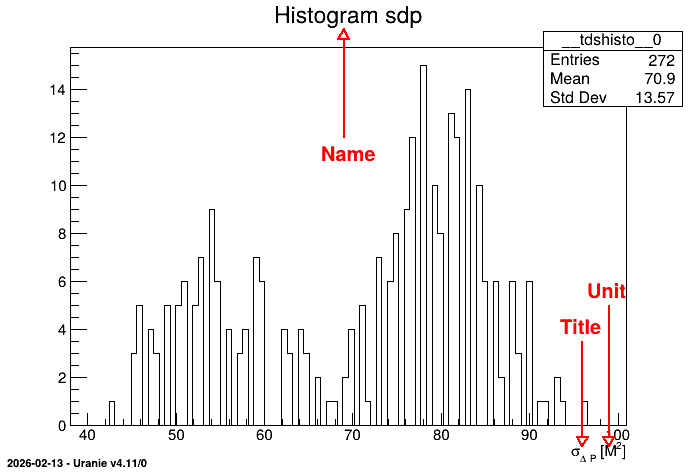
Figure 2.3 Graph of the variable
sdpName + variation boundary: constructor defined by the name of the variable and the lower and upper boundaries. The two other pieces of information, label and key remain equal to the title. An example of use is
TAttribute *x = new TAttribute("x", -2.0, 4.0);
Name + EType: constructor defined by the name of the variable and nature of the corresponding attribute . An example of use is
TAttribute *xvec = new TAttribute("x", URANIE::DataServer::TAttribute::kVector);
Setter methods allow to fill the other fields (title, key, etc ) generally by calling set
and the name of the information to be modified (a restricted list of available methods being given
below). For instance, the plot “x2:x1” of TDataServer data tdsGeyser (whose data file geyser.dat
can be found in the Uranie-macros folder) can be considered again and we can replace the fields
title and unit with new values by using LaTeX instructions. For instance, let us consider
once again the graph of TDataServer data tdsGeyser:
    TAttribute *px1 = tdsGeyser.getAttribute("x1");
    px1->setTitle("#Delta P^{#sigma}"); // Change the title
    px1->setUnity("#frac{mm^{2}}{s}"); // Change the unit
    tdsGeyser.draw("x2:x1"); // Draw the plot
The first line consists in retrieving the attribute pointer x1, while the others are self
explanatory. This results in a new graph (scatterplot) of x2 versus x1 for the TDataServer
constructed from the geyser file with updated field title and unit values, shown in
Figure 2.4.
Figure 2.4 Scatterplot 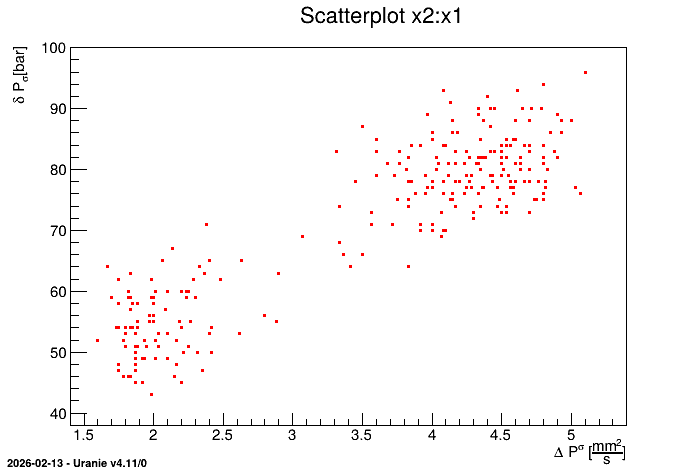
x2 versus x1 for the geyser data with modification of fields title and
unit
Most of the information can be modified by “setter” methods. Here is a short list of the most relevant one starting with simple and already discussed attribute properties:
setTitle(TString str): assigns the character string str passed as argument to the field title;
setUnity(TString str: assigns the character string str passed as argument to the field unity;
setNote(TString str): assigns the character string str passed as argument to the field note;
setUpperBound/setLowerBound/setDefaultValue(double val): assigns or changes (if it already existed) respectively the upper, lower or default value for this attribute.
setDataType(EType thetype or TString str): changes the nature of the attribute given the enumerator value or a character chain (case insensitive). In the latter case, the enumerator is set to:
kReal: str = “double” or “real” or “d”;
kString: str = “string” or “s”
kVector: str = “vector” or “v”
Given the new nature of attributes (meaning vectors and strings) a more generic method has been created to put default values to all type. The generic methods takes only one argument, a string containing values whatever the type. In cas of doubt, dedicated methods have also been created, with dedicated prototypes:
kReal: both
setDefault(TString value)andBool_t setDefaultValue(Double_t val)can be used as shown belowTAttribute *real = new TAttribute("real"); double real_value=1.23456789; real->setDefaultValue(real_value); // Default with double value real->setDefault("1.23456789"); // Default with generic method
kVector: both
setDefault(TString value)andsetDefaultVectorvector<double> &vec)can be used as shown belowTAttribute *vector = new TAttribute("vector",TAttribute::kVector); std::vector<double> v_value={1.2,2.3,3.4}; vector->setDefaultVector(v_value); // Default with double value vector->setDefault("1.2,2.3,3.4"); // Default with generic method
kString: both
setDefault(TString value)andsetDefaultString(TString val)can be used as shown belowTAttribute *string = new TAttribute("string",TAttribute::kString); TString str_value="chocolat"; string->setDefaultString(str_value); // Default with double value string->setDefault(str_value); // Default with generic method
There are also important setters, used to connect attributes to ASCII files. Most of the time, ASCII files are indeed used to communicate with an external code and Uranie must know in this case where to find the useful information for the corresponding attributes (either to write a new value that would be used as input to perform a calculation or to read the output of another computation). This is more carefully detailed in Code input and output files.
setFileKey(TString sfile, TString skey,TString sformatToSubstitute, TAttributeFileKey::EFileType sFileType): allows to specify for an attribute a file sfile, a key linked to this file skey, a writing format of the value of this key in the previous file sformatToSubstitute, and also the type of the file sFileType. This is heavily discussed in The Launcher module.