2.3.4. Adding attributes to a TDataServer
Attributes can always be added to an existing TDataServer object, whether it is empty (just after its
constructor) or not (after the data loading from either an ASCII file, or a TTree or a database of
type SQL). A simple example is provided and decomposed in
Macro “dataserverAttributes.C”.
First of all, let us consider the case of an empty TDataServer. We add attributes using the method
addAttribute( TAttribute *att).
    TDataServer * tds = new TDataServer("tds", "new TDataServer");
    tds->addAttribute( new TAttribute("x1"));             // (1)
    tds->addAttribute( new TAttribute("x2", 2.5, 5.));    // (2)
    tds->addAttribute( "x3" );                            // (3)
    tds->addAttribute( "x4", 2.5, 5.);                    // (4)
Description of attributes adding to an empty TDataServer
Adding a new attribute x1 to the TDataServer from a
TAttributewith a name (minimal constructor).Adding a new attribute x2 to the TDataServer from a
TAttributewith a name and the extreme values (minimal and maximal).Equivalent to previous one: adding a new attribute x3 to the TDataServer just by giving its name (minimal constructor).
Equivalent to previous one: adding a new attribute x4 to the TDataServer by giving its name and the extreme values (minimal and maximal).
The difference between the methods with new in it and the others, is basically arising
from the way one handles the memory. The last ones (3 and 4) allow the user not to worry about
anything, while, in the case of implementation 1 and 2, one should be aware that every new should
imply at some point a delete. For most user, this is not of utmost importance as usual scripts
would contain very few new command and no loop. If this is not the case (for instance if one does
have loop and many object creation in it) do not hesitate to contact the Uranie-team to prevent
any slowing down of the code.
The specification of a TAttribute is further detailed in The TAttribute class.
We can define new attributes using mathematical expressions with respect to other existing attributes. The name and the mathematical expression are the only mandatory arguments; its title and unit can also be precised, but both arguments are optional.
    TDataServer * tdsGeyser = new TDataServer("tdsgeyser", "Geyser DataSet");
    tdsGeyser->fileDataRead("geyser.dat");
    tdsGeyser->addAttribute("cd1", "sqrt(x2) * x1"); // (1)
    tdsGeyser->addAttribute("cd2", "sqrt(x2* x1)", "#Delta p_{#sigma}", "sec^{-1}"); //(2)

    tdsGeyser->draw("cd2:cd1"); // (3)
Description attribute adding to a TDataServer from formulas
Adding a new attribute cd1 to the TDataServer defined by a mathematical expression as a function of x1 and x2 attributes:
\[cd1 \; = \; x_1 * \sqrt{x_2}\]Adding a new attribute cd2 to the TDataServer with a mathematical formula, precising its title and unit:
\[cd2 \; = \; \sqrt{x_2 * x_1}\]Plots the scatterplot of the variable cd2 versus the variable cd1
The obtained graph is:
Figure 2.39 Scatterplot of added attributes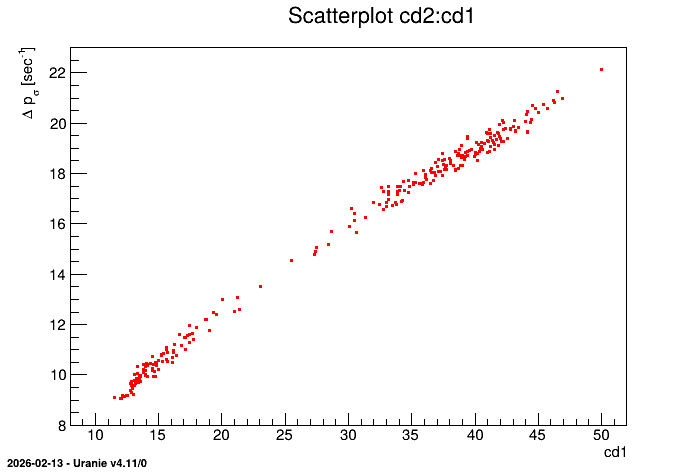
This operation is available with vector-type attribute as well. The results depends on the nature of
the attributes involved in the formula, their content and the nature of the operation. As an example,
a simple dataserver is created from the dummy file tdstest.dat:
#COLUMN_NAMES: x| y| a| v
#COLUMN_TYPES: V|V|D|V

1,2,3 4,5,6 2 1,2,3
7,8,9 1,2   4 4,5,6
1,4,8 2,5,4 5 7,8,9
It contains two vectors whose size are not constant and a double. The four usual operations have been performed (addition, subtraction, multiplication and division) using the double and a vector but also using the two vectors. The code is shown here:
    TDataServer *tdsop =new TDataServer("foo","poet");
    tdsop->fileDataRead("tdstest.dat");

    tdsop->addAttribute("x*y","x*y"); // Multiply two vectors
    tdsop->addAttribute("xovy","x/y"); // Divide two vectors
    tdsop->addAttribute("x-y","x-y"); // Subtract two vectors
    tdsop->addAttribute("x+y","x+y"); // Add two vectors

    tdsop->addAttribute("x*a","x*a"); // Multiply a vector and a double
    tdsop->addAttribute("xova","x/a"); // Divide a vector and a double
    tdsop->addAttribute("x-a","x-a"); // Subtract a vector and a double
    tdsop->addAttribute("x+a","x+a"); // Add a vector and a double

    tdsop->scan("x:y:a:x*y:xovy:x+y:x-y:x*a:xova:x+a:x-a","","colsize=3 col=1:1:1::4::::4:");
and it gives as a results:
*************************************************************************************
*    Row   * Instance * x * y * a * x*y * xovy * x+y * x-y * x*a * xova * x+a * x-a *
*************************************************************************************
*        0 *        0 * 1 * 4 * 2 *   4 * 0.25 *   5 *  -3 *   2 *  0.5 *   3 *  -1 *
*        0 *        1 * 2 * 5 * 2 *  10 *  0.4 *   7 *  -3 *   4 *    1 *   4 *   0 *
*        0 *        2 * 3 * 6 * 2 *  18 *  0.5 *   9 *  -3 *   6 *  1.5 *   5 *   1 *
*        1 *        0 * 7 * 1 * 4 *   7 *    7 *   8 *   6 *  28 * 1.75 *  11 *   3 *
*        1 *        1 * 8 * 2 * 4 *  16 *    4 *  10 *   6 *  32 *    2 *  12 *   4 *
*        1 *        2 * 9 *   * 4 *   0 *      *   0 *   0 *  36 * 2.25 *  13 *   5 *
*        2 *        0 * 1 * 2 * 5 *   2 *  0.5 *   3 *  -1 *   5 *  0.2 *   6 *  -4 *
*        2 *        1 * 4 * 5 * 5 *  20 *  0.8 *   9 *  -1 *  20 *  0.8 *   9 *  -1 *
*        2 *        2 * 8 * 4 * 5 *  32 *    2 *  12 *   4 *  40 *  1.6 *  13 *   3 *
*************************************************************************************
Summary: Adding attributes
Two kinds of method, allow to add an attribute to a TDataServer:
With attribute properties:
addAttribute( TAttribute *att) /addAttribute( TString name)The pointer
attis either ofTAttributetype or a derived classTAttributeFormulaorTStochasticAttributetype.By means of other existing attributes:
addAttribute( TString name, TString formula, TString label=””, TString unity=”” )Adding an attribute by specifying its name and its mathematical formula (these two arguments are mandatory), and its title and its unit (optional arguments).
A warning has been added if formula is requested using a string-type branch. In the case of vector, the behaviour should depend on the nature of the branches in the formula.