13.7.2. Macro “relauncherFunctionFlowrateCJit.C”
13.7.2.1. Objective
The goal of this macro is to show how to handle the C++-written function using a pointer to the
function (and not the name as for the macro in Macro “relauncherFunctionFlowrateCInt.C”). This function
has been presented, at least its equation (see Equation 4.1) and would be interface
through the TCJitEval class in the Relauncher module. A special discussion will be held in the next
few lines about the way the compilation is done.
13.7.2.2. Macro
#include "TCanvas.h"
#include "TMath.h"
#include "TSystem.h"
#include "TDataServer.h"
#include "TSequentialRun.h"
#include "TAttribute.h"
#include "TLauncher2.h"
#include "TCJitEval.h"

using namespace URANIE::DataServer;
using namespace URANIE::Relauncher;

void flowrateModel(double *x, double *y)
{
  double drw = x[0], dr  = x[1];
  double dtu = x[2], dtl = x[3];
  double dhu = x[4], dhl = x[5];
  double dl  = x[6], dkw = x[7];

  double dnum = 2.0 * TMath::Pi() * dtu * ( dhu -dhl);
  double dlnronrw = TMath::Log( dr / drw);
  double dden = dlnronrw * ( 1.0 +  ( 2.0 * dl * dtu ) / ( dlnronrw * drw * drw * dkw) + dtu / dtl );

  y[0] = dnum / dden;
}

// void relauncherFunctionFlowrateCJit() // For ACLIC (meaning CINT) compilation
int main() // For standalone compilation
{

  // Create the TDataServer
  TDataServer *tds = new TDataServer("foo","test");
  tds->fileDataRead("flowrateUniformDesign.dat");

  // Get the attributes
  TAttribute *rw = tds->getAttribute("rw");
  TAttribute *r = tds->getAttribute("r");
  TAttribute *tu = tds->getAttribute("tu");
  TAttribute *tl = tds->getAttribute("tl");
  TAttribute *hu = tds->getAttribute("hu");
  TAttribute *hl = tds->getAttribute("hl");
  TAttribute *l = tds->getAttribute("l");
  TAttribute *kw = tds->getAttribute("kw");

  // Create the output attribute
  TAttribute *yhat = new TAttribute("yhat");

  // Constructing the code
  TCJitEval mycode(flowrateModel);
  mycode.setInputs(8, rw, r, tu, tl, hu, hl, l, kw); // Adding the input attribute
  mycode.addOutput(yhat); // Adding the output attribute

  // Create the sequential runner
  TSequentialRun run(&mycode);
  run.startSlave(); //Start the master (necessary even for a sequential)
  if (run.onMaster())
  {
    TLauncher2 lanceur(tds, &run);

    // resolution
    lanceur.solverLoop();
    run.stopSlave(); // Stop the slaves (necessary even for a sequential)
  }

  // Export the data
  tds->exportData("_outputFile_functionflowrate_cjit_.dat");

}
The very first part of the macro is slightly different from Macro as it is now compulsory to write explicitly the include line for the pre-processors. The use of namespaces is declared along, but this time only because this is convenient not to recall these long names every time.
#include "TCanvas.h"
#include "TMath.h"
#include "TSystem.h"
#include "TDataServer.h"
#include "TSequentialRun.h"
#include "TAttribute.h"
#include "TLauncher2.h"
#include "TCJitEval.h"

using namespace URANIE::DataServer;
using namespace URANIE::Relauncher;
The definition of the flowrateModel function is then made right before entering the main function.
At this level a break is needed to explain the risen antagonism between the two possible compilation
and the way to call them. This issue is entirely described by the following two lines:
// void relauncherFunctionFlowrateCJit() // For ACLIC (meaning CINT) compilation
int main() // For standalone compilation
Let’s talk about the two cases:
ACLIC: one should remove the second line and put the first one instead (after commenting it out of course). The compilation is then done by calling:
root -l relauncherFunctionFlowrateCJit.C+
PROS: this will give you the hand at the end of execution, leaving the display opened to handle plots for instance.
CONS: this will create several useless files and will need non-trivial manipulation if extra headers and libraries are needed.
Standalone: leaving the macro as it is, the compilation on Linux is done by writing a line such as:
g++ -o CJitTest relauncherFunctionFlowrateCJit.C $(root-config --cflags --libs) -L$URANIESYS/lib -lUranieDataServer -lUranieRelauncher -I$URANIESYS/include/
An equivalent command on Windows would be:
Invoke-Expression "cl /FeCJitTest /Tp relauncherFunctionFlowrateCJit.C ${CFLAGS} $(root-config --libs) libUranieDataServer.lib libUranieRelauncher.lib"
PROS: pure C++ compilation resulting in a single executable file (here CJitTest). It’s easy to include more headers and libraries if your code needs them.
CONS: this will not leave the display opened, unless you do so through a
TApplication(ROOT-class).
Whatever the chosen solution, the only difference with previous macro is the assessor creation:
TCJitEval mycode(flowrateModel);
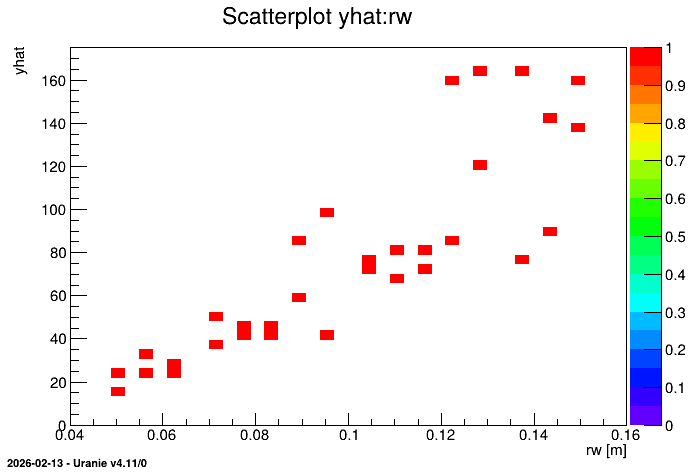
The rest it completely transparent and leads to the creation of the following plot.
13.7.2.3. Graph
Figure 13.47 Representation of the output as a function of the first input with a colZ option