13.7.4. Macro “relauncherCodeFlowrateSequential.C”
13.7.4.1. Objective
The goal of this macro is to show how to handle a code with a sequential runner. The flowrate code
is provided with Uranie and has been also used and discussed throughout these macros.
13.7.4.2. Macro
    // Create the TDataServer
    TDataServer *tds = new TDataServer("foo","test");

    TCanvas *can = new TCanvas("pouet","foo",1);

    tds->fileDataRead("flowrateUniformDesign.dat");

    // Get the attributes
    TAttribute *rw = tds->getAttribute("rw");
    TAttribute *r = tds->getAttribute("r");
    TAttribute *tu = tds->getAttribute("tu");
    TAttribute *tl = tds->getAttribute("tl");
    TAttribute *hu = tds->getAttribute("hu");
    TAttribute *hl = tds->getAttribute("hl");
    TAttribute *l = tds->getAttribute("l");
    TAttribute *kw = tds->getAttribute("kw");

    // Create the output attribute
    TAttribute *yhat = new TAttribute("yhat");
    TAttribute *d = new TAttribute("d");

    // Set the reference input file and the key for each input attributes
    TFlatScript fin("flowrate_input_with_values_rows.in");
    fin.setInputs(8, rw, r, tu, tl, hu, hl, l, kw);

    // The output file of the code
    TFlatResult fout("_output_flowrate_withRow_.dat");
    fout.setOutputs(2, yhat, d);// Passing the attributes to the output file

    // Constructing the code
    TCodeEval mycode( "flowrate -s -r" );
    mycode.setOldTmpDir();
    mycode.addInputFile(&fin); // Adding the input file
    mycode.addOutputFile(&fout); // Adding the output file

    // Create the sequential runner
    TSequentialRun run(&mycode);
    run.startSlave(); //Start the master (necessary even for a sequential)
    if (run.onMaster())
    {
        TLauncher2 lanceur(tds, &run);

        // resolution
        lanceur.solverLoop();
        run.stopSlave(); // Stop the slaves (necessary even for a sequential)
    }

    // Draw the result
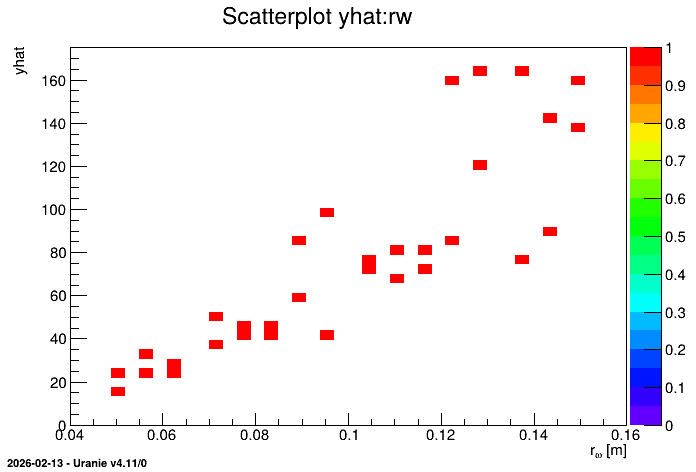
    tds->Draw("yhat:rw","","colZ");
Here again, a comparison is drawn with the first Relauncher macro (see Macro) and only the differences are pointed out. The first obvious one, in the very first steps in defining the dataserver and the attributes, is that there are two output attributes. The second one (called ‘d’) will not be used here. The second (and only other difference) with respect to the CINT function code, is the assessor creation shown below:
    // Set the reference input file and the key for each input attributes
    TFlatScript fin("flowrate_input_with_values_rows.in");
    fin.setInputs(8, rw, r, tu, tl, hu, hl, l, kw);

    // The output file of the code
    TFlatResult fout("_output_flowrate_withRow_.dat");
    fout.setOutputs(2, yhat, d);// Passing the attributes to the output file

    // Constructing the code
    TCodeEval mycode( "flowrate -s -r" );
    mycode.setOldTmpDir();
    mycode.addInputFile(&fin); // Adding the input file
    mycode.addOutputFile(&fout); // Adding the output file
The first three lines create the input file instance. It is here a TFlatScript object which can
basically be compared to a DataServer (or Salome-table) format of the Launcher module for its
organisation (particularly with vectors and strings) but without the compulsory header: the order in
which you introduce the attribute is then of uttermost importance. The second block of lines is
creating the output file object from the TFlatResult class (the same remark applies to this object).
Finally the assessor itself is created as an instance of the TCodeEval class. The only argument is
the command to be run, and it needs at least one input and output file. Apart from that, the runner
is created and the rest is crystal clear, leading to the following plot.
13.7.4.3. Graph
Figure 13.48 Representation of the output as a function of the first input with a colZ option