2.3.2. Import data from an ASCII file
An example of import of the data file "geyser.dat" (available in the Uranie-macros folder) is
shown below leading to a 2D scatterplot of the variable x2 versus the variable x1
from URANIE import DataServer # (1)

tdsGeyser = DataServer.TDataServer("tdsgeyser", "Geyser database") # (2)
tdsGeyser.fileDataRead("geyser.dat") # (3)
tdsGeyser.draw("x2:x1") # (4)
Description of the import of an ASCII file
Setting the namespace. This instruction is useless when the provided rootlogon has been loaded as all Uranie-namespaces have been loaded as well.
Defining a pointer tdsGeyser to an object of type
TDataServerwhose name is “tdsgeyser” and whose title is “Geyser database”. These information are used by theexportorprintLogmethods.Loading data contained in an ASCII file
$URANIESYS/share/uranie/macros/geyser.dat.Plot of the scatterplot of the variable x2 versus the variable x1
The obtained graph is the following:
Figure 2.36 Import data from an ASCII file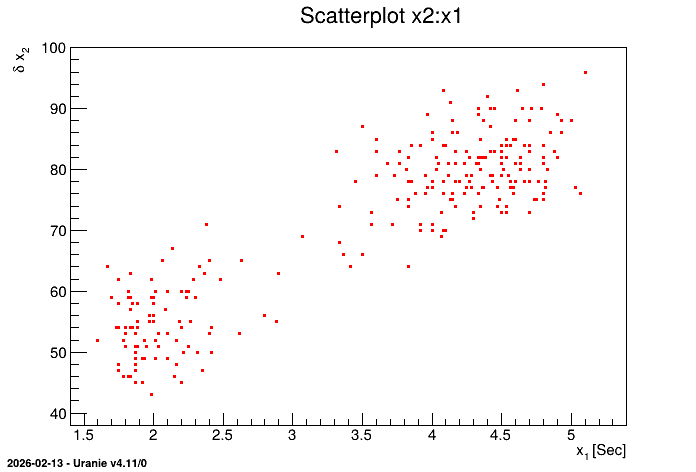
Various examples of macros loading data in a TDataServer with different treatment applied on, are provided
in the use-case chapter of this user manual, between
Macro “dataserverLoadASCIIFilePasture.py” and
Macro “dataserverLoadASCIIFileCornell.py”.
Summary: Loading data ( ASCII file )
fileDataRead( TString filename, bool saveTuple=true, bool preAddReload=false)Loads the data contained in the ASCII file (“Salome-table” format). The possible arguments are:
The name of the file (compulsory)
A boolean to state whether the file should be saved as root-ntuple once the reading is complete (not mandatory, set to true by default)
A boolean to allow pre-adding or reloading a database (advanced, not recommended for beginners). This allows
Pre-adding variables: very technical. It should not be used unless discussed with developers.
Reloading database: Allow to reload a database file without complaining, AS long AS the provided file exactly matches the list of attribute in the
TDataServerobject
fileDataReadJSon( TString filename, bool saveTuple=true)Loads the data contained in the ASCII file (JSON format). The possible arguments are:
The name of the file (compulsory)
A boolean to state whether the file should be saved as root-ntuple once the reading is complete (not mandatory, set to true by default)