2.1. Introduction
The DataServer module is the spine of the Uranie platform as it is where the data are stored, the
attributes (name given to the variable in Uranie) are gathered and important basic mathematical
operations are performed. Objects and methods will indeed need a TDataServer to retrieve, process and
transmit the results of their own operations.
Since it is used by all other technical libraries (Sampler, Launcher, …), this library is the
core library of Uranie (as shown in Figure 1.1). The already discussed
TDataServer contains two main objects (has shown in Figure 2.1):
the header: represented in Uranie by the object
TDataSpecification. Different information related to the variables (called in “attributes” in Uranie language and represented byTAttributeobjects) are specified in The TAttribute class.the data matrix: represented by the object
TDSNtupleD(class derived from the ROOT classTTree). For an advanced use of this object, the reader can refer to chapter XII “Trees ROOT” in ROOT’s user manual.
Figure 2.1 Diagram of the class 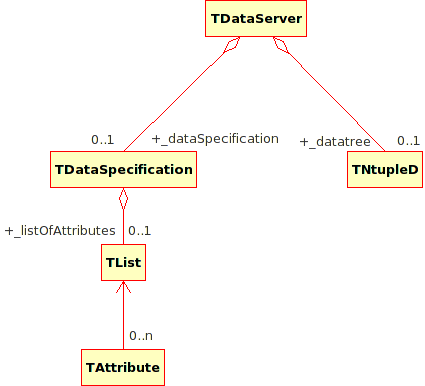
TDataServer
The chapter presentation will be articulated as follows. First of all, the way variable are handled
will be introduced in The TAttribute class. This is a needed step, as all TDataServer have to be
filled with attributes for being able to move along. The creation of a TDataServer (with many
construction, from ASCII to ROOT files) is discussed in Data handling before
discussing the basic statistical treatment (in Statistical treatments and operations) and the dedicated
visualisation tool (in Visualisation dedicated to uncertainties).
Tip
An important point to know for the use of Uranie: all options are not case sensitive. Actually, the treatment of these options is taken anyway as lowercase. The following instructions are equivalent:
tdsGeyser.draw("x1","","Nclass=Sturges")
tdsGeyser.draw("x2","","nclass=Sturges")
tdsGeyser.draw("x2","","nclass=sturges")
tdsGeyser.draw("x2","","NCLASS=STURGES")