13.2.16. Macro “dataserverDrawPPPlot.C”
13.2.16.1. Objective
This macro is an example of how to produce PP-plot for a certain number of randomly-drawn samples, providing the correct parameter values along with modified versions to illustrate the impact.
13.2.16.2. Macro Uranie
    TDataServer *tds0 = new TDataServer();

    //Create the canvas
    TCanvas *c = new TCanvas("c1","",800,1000);
    TPad *apad = new TPad("apad","apad",0, 0.03, 1, 1);

    // Create a TDS with 8 kind of distributions
    double p1=1.3, p2=4.5, p3=0.9, p4=4.4; // Fixed values for parameters

    tds0->addAttribute(new TNormalDistribution("norm", p1, p2));
    tds0->addAttribute(new TLogNormalDistribution("logn", p1, p2));
    tds0->addAttribute(new TUniformDistribution("unif", p1, p2));
    tds0->addAttribute(new TExponentialDistribution("expo", p1, p2));
    tds0->addAttribute(new TGammaDistribution("gamm", p1, p2, p3));
    tds0->addAttribute(new TBetaDistribution("beta", p1, p2, p3, p4));
    tds0->addAttribute(new TWeibullDistribution("weib", p1, p2, p3));
    tds0->addAttribute(new TGumbelMaxDistribution("gumb", p1, p2));

    // Create the sample
    TBasicSampling *fsamp = new TBasicSampling(tds0, "lhs", 200);
    fsamp->generateSample();

    // Define number of laws, their name and numbers of parameters
    unsigned int nLaws=8;
    string laws[8]={"normal", "lognormal", "uniform", "gamma", "weibull", "beta", "exponential", "gumbelmax"}; // number of parameters to put in () for the corresponding law
    int npar[8]={2, 2, 2, 3, 3, 4, 2, 2};

    //Create the 8 pads
    apad->Draw();
    apad->cd();
    apad->Divide(2,4);

    // Number of points to compare theoretical and empirical values
    int nS=1000;
    double mod=0.8; // Factor used to artificially change the parameter values

    TString opt=""; //option of the drawPPPlot method
    stringstream sstr;
    for(unsigned int ilaw=0; ilaw<nLaws; ilaw++)
    {
        // Clean sstr
        sstr.str("");
        // Add nominal configuration
        sstr << laws[ilaw] << "("<<p1<<","<<p2<<((npar[ilaw]>=3)?Form(",%g",p3):"")<<p2<<((npar[ilaw]>=4)?Form(",%g",p4):"")<<")";
        // Changing par1
        sstr << ":" << laws[ilaw] << "("<<p1*mod<<","<<p2<<((npar[ilaw]>=3)?Form(",%g",p3):"")<<p2<<((npar[ilaw]>=4)?Form(",%g",p4):"")<<")";
        // Changing par2
        sstr << ":" << laws[ilaw] << "("<<p1<<","<<p2*mod<<((npar[ilaw]>=3)?Form(",%g",p3):"")<<p2<<((npar[ilaw]>=4)?Form(",%g",p4):"")<<")";
        // Changing par3
        if(npar[ilaw] >=3 )
            sstr << ":" << laws[ilaw] << "("<<p1<<","<<p2<<((npar[ilaw]>=3)?Form(",%g",p3*mod):"")<<p2<<((npar[ilaw]>=4)?Form(",%g",p4):"")<<")";
        // Changing par4
        if(npar[ilaw] >=4 )
            sstr << ":" << laws[ilaw] << "("<<p1<<","<<p2<<((npar[ilaw]>=3)?Form(",%g",p3):"")<<p2<<((npar[ilaw]>=4)?Form(",%g",p4*mod):"")<<")";
        cout<<sstr.str()<<endl;

        apad->cd(ilaw+1);
        // Produce the plot
        tds0->drawPPPlot( laws[ilaw].substr(0,4).c_str(), sstr.str().c_str(), nS, opt);
    }
The macro is based on the one discussed in Macro “dataserverDrawQQPlot.C”. The only difference is this line
tds0->drawPPPlot( laws[ilaw].substr(0,4).c_str(), sstr.str().c_str(), nS, opt);
The call of the drawing method above can be resume, for the first case, like this:
tds0->drawPPPlot( "norm", "normal(1.3,4.5):normal(1.04,4.5):normal(1.3,3.6)", nS);
The first field is the attribute to be tested, while the second one provides the three hypothesis with which our attribute under investigation will be compared. The third argument is the number of steps to be computed for probabilities.
The result of this macro is shown below.
13.2.16.3. Graph
Figure 13.8 Graph of the macro 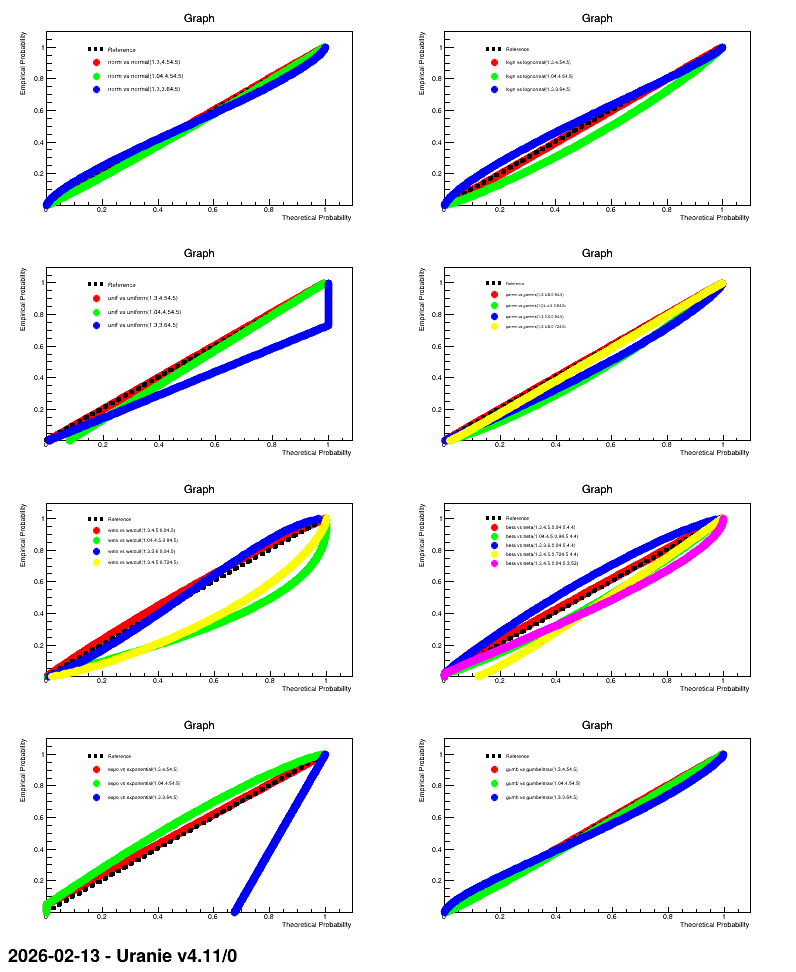
"dataserverDrawPPPlot.C"