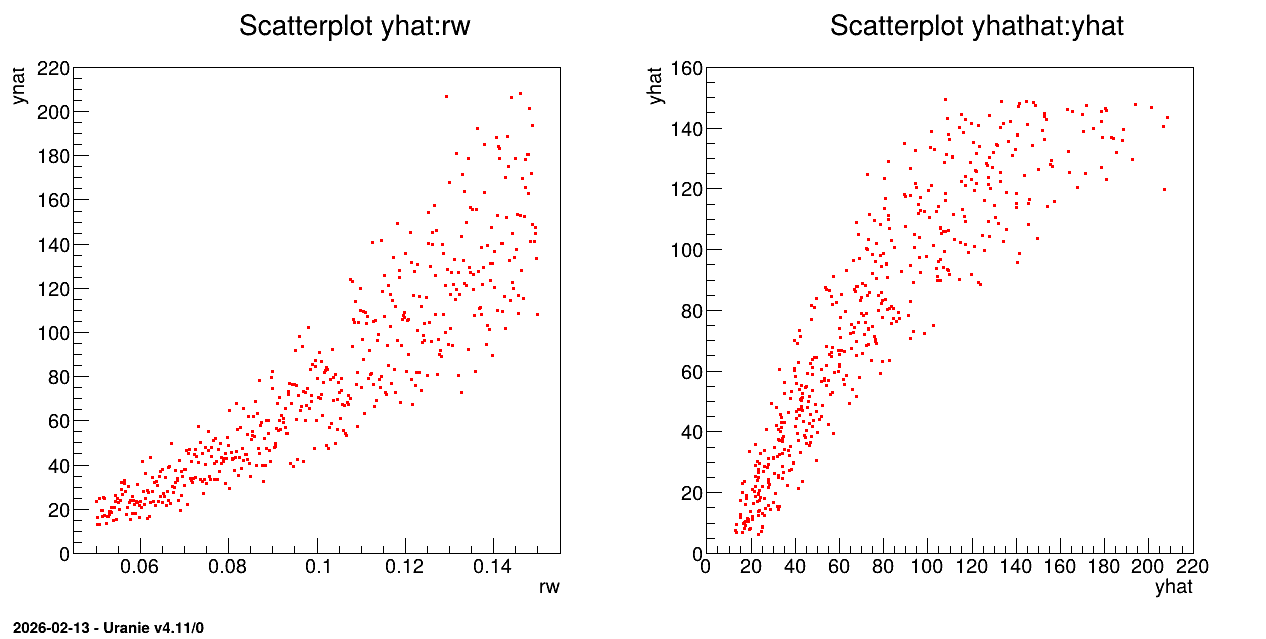
13.7.2. Macro “modelerFlowrateLinearRegression.py”
13.7.2.1. Objective
The objective of this macro is to build a linear regression between a predictor rw and a target
variable yhat from the database contained in the ASCII file flowrate_sampler_launcher_500.dat
defining values for the eight variables described in Presentation of the problem
on 500 patterns.
13.7.2.2. Macro Uranie
"""
Example of linear regression on flowrate
"""
from URANIE import DataServer, Modeler
import ROOT

tds = DataServer.TDataServer()
tds.fileDataRead("flowrate_sampler_launcher_500.dat")

c = ROOT.TCanvas("c1", "Graph for the Macro modeler", 5, 64, 1270, 667)
pad = ROOT.TPad("pad", "pad", 0, 0.03, 1, 1)
pad.Draw()
pad.Divide(2)
pad.cd(1)
tds.draw("yhat:rw")

# tds.getAttribute("yhat").setOutput()

tlin = Modeler.TLinearRegression(tds, "rw", "yhat", "DummyForPython")
tlin.estimate()

pad.cd(2)
tds.draw("yhathat:yhat")

tds.startViewer()
The TDataServer is loaded with the database contained in the file flowrate_sampler_launcher_500.dat
with the fileDataRead method:
tds = DataServer.TDataServer()
tds.fileDataRead("flowrate_sampler_launcher_500.dat")
The linear regression is initialised and characteristic values are computed for rw with the
estimate method:
tlin = Modeler.TLinearRegression(tds, "rw", "yhat", "DummyForPython")
tlin.estimate()
The last argument is the option field, which in most cases is empty. Here it is filled with
“DummyPython” which helps specify to python which constructor to choose. There are indeed several
possible constructors these 5 five first arguments, but C++ can make the difference between them as
the literal members are either std::string, ROOT::TString, Char_t* or even Option_t*. For
python, these format are all PyString, so the sixth argument is compulsory to disentangle the
possibilities.
13.7.2.3. Graph
Figure 13.38 Graph of the macro “modelerFlowrateLinearRegression.py”