13.8.1. Macro “relauncherFunctionFlowrateCInt.py”
13.8.1.1. Objective
The goal of this macro is to show how to handle (in the most simple way) a C++-written function,
compliant with the ROOT (CINT) format. This function has been presented, at least its equation
(see Equation 4.1) and would be interfaced through the
TCIntEval class in the Relauncher module (which means that we’ll use the function database from
ROOT’s catalog, see Important modifications going from ROOT v5 to ROOT v6 for more explanations). As this class is
usually considered not thread-safe, it can only be used with a TSequentialRun runner.
13.8.1.2. Macro
"""
Example of function launching in sequential mode
"""
from URANIE import DataServer, Relauncher
import ROOT

# Create the DataServer.TDataServer
tds = DataServer.TDataServer("foo", "test")
tds.fileDataRead("flowrateUniformDesign.dat")

# Get the attributes
rw = tds.getAttribute("rw")
r = tds.getAttribute("r")
tu = tds.getAttribute("tu")
tl = tds.getAttribute("tl")
hu = tds.getAttribute("hu")
hl = tds.getAttribute("hl")
lvar = tds.getAttribute("l")
kw = tds.getAttribute("kw")

# Create the output attribute
yhat = DataServer.TAttribute("yhat")

# Constructing the code
ROOT.gROOT.LoadMacro("UserFunctions.C")
mycode = Relauncher.TCIntEval("flowrateModel")
mycode.addInput(rw)
mycode.addInput(r)
mycode.addInput(tu)
mycode.addInput(tl)
mycode.addInput(hu)
mycode.addInput(hl)
mycode.addInput(lvar)
mycode.addInput(kw) # Adding the input attributes
mycode.addOutput(yhat)  # Adding the output attributes

# Create the sequential runner
run = Relauncher.TSequentialRun(mycode)
run.startSlave()  # Start the master (necessary even for a sequential)
if run.onMaster():

    lanceur = Relauncher.TLauncher2(tds, run)

    # resolution
    lanceur.solverLoop()
    run.stopSlave()  # Stop the slaves (necessary even for a sequential)

# Draw the result
can = ROOT.TCanvas("pouet", "foo", 1)
tds.Draw("yhat:rw", "", "colZ")
The first part of the macro is the definition of the flowrateModel function, already discussed
throughout this documentation. The dataserver object is then created and filled using the database
file and pointers to the corresponding input attributes are created, along with the new attribute for
the output provided by the function. The following part is then specific to the Relauncher
organisation: a TCIntEval object is created with the function as only argument. Both the input and
output attributes are provided (here in a contracted way for input, but it could have been done
one-by-one, as for output).
# Constructing the code
mycode = Relauncher.TCIntEval("flowrateModel")
mycode.addInput(rw)
mycode.addInput(r)
mycode.addInput(tu)
mycode.addInput(tl)
mycode.addInput(hu)
mycode.addInput(hl)
mycode.addInput(lvar)
mycode.addInput(kw) # Adding the input attributes
mycode.addOutput(yhat)  # Adding the output attributes
The methods setInputs and setOutputs are not allowed in python, so attributes has to be added
one-by-one.
The following part is the heart of the relauncher strategy: the assessor is provided to the chosen runner, which should always start the slaves (even in the case of a sequential one like here). On the main CPU, the master is created as well (with the dataserver and the runner) and the resolution is requested.
# Create the sequential runner
run = Relauncher.TSequentialRun(mycode)
run.startSlave()  # Start the master (necessary even for a sequential)
if run.onMaster():

    lanceur = Relauncher.TLauncher2(tds, run)

    # resolution
    lanceur.solverLoop()
    run.stopSlave()  # Stop the slaves (necessary even for a sequential)
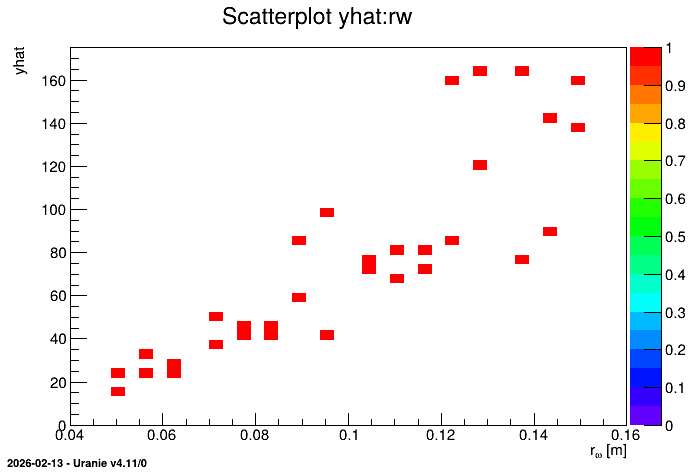
Once this is done, the slaves are stopped and the results is displayed for cross-check in the following subsection.
13.8.1.3. Graph
Figure 13.46 Representation of the output as a function of the first input with a colZ option