13.8.9. Macro “relauncherCodeMultiTypeKeyEmptyVectors.py”
13.8.9.1. Objective
The objective of this macro is to test the case where vectors and strings are produced as outputs, using the code described in Producing outputs, with a Key format, obtained by doing:
multitype -mtKey -empty
Unlike what’s done to in Macro “relauncherCodeMultiTypeKey.py”, the “-empty” allows the code to
generate empty vectors and not only vectors whose size would be between 1 and 15 elements. The
resulting output file used is a key-format one in a condensate form, named
_output_multitype_mt_Key_condensate_.dat looks like:
w1 = nine
v1 = [ -0.512095,0.039669,-1.3834,1.37667,0.220672,0.633267,1.37027,-0.765636 ]
v2 = [ 14.1981,14.0855,10.7848,9.45476,9.17308,6.60804,10.0711,14.1761,10.318,12.5095,15.6614,10.3452,9.41101,7.47887 ]
f1 = 32.2723
w2 = eight
13.8.9.2. Macro Uranie
"""
Example of code launching for which empty vectors are possible
"""
from URANIE import DataServer, Relauncher, Sampler
import ROOT
# Create the DataServer.TDataServer and create the seed attribute
tds = DataServer.TDataServer("foo", "multitype usecase")
tds.addAttribute(DataServer.TUniformDistribution("seed", 0, 100000))

# Create DOE
tsam = Sampler.TSampling(tds, "lhs", 100)
tsam.generateSample()

# Create output attribute pointers
w1 = DataServer.TAttribute("w1", DataServer.TAttribute.kString)
w2 = DataServer.TAttribute("w2", DataServer.TAttribute.kString)
v1 = DataServer.TAttribute("v1", DataServer.TAttribute.kVector)
v2 = DataServer.TAttribute("v2", DataServer.TAttribute.kVector)
f1 = DataServer.TAttribute("f1")

# Create the input files
inputFile = Relauncher.TFlatScript("multitype_input.dat")
inputFile.addInput(tds.getAttribute("seed"))

# Create the output files
outputFile = Relauncher.TKeyResult("_output_multitype_mt_Key_condensate_.dat")
outputFile.addOutput(w1, "w1")
outputFile.addOutput(v1, "v1")
outputFile.addOutput(v2, "v2")
outputFile.addOutput(f1, "f1")
outputFile.addOutput(w2, "w2")
outputFile.setVectorProperties("[", ", ", "]")

# Create the user's evaluation function
myeval = Relauncher.TCodeEval("multitype -mtKey -empty")
myeval.addInputFile(inputFile)  # Add the input file
myeval.addOutputFile(outputFile)  # Add the output file

# Create the runner
runner = Relauncher.TSequentialRun(myeval)

# Start the slaves
runner.startSlave()
if runner.onMaster():

    # Create the launcher
    lanceur = Relauncher.TLauncher2(tds, runner)
    lanceur.solverLoop()

    # Stop the slave processes
    runner.stopSlave()

# Produce control plot
Can = ROOT.TCanvas("Can", "Can", 10, 10, 1000, 800)
pad = ROOT.TPad("pad", "pad", 0, 0.03, 1, 1)
pad.Draw()
pad.Divide(1, 2)
pad.cd(1)
tds.getTuple().SetLineColor(2)
tds.getTuple().SetLineWidth(2)
tds.Draw("size__v1")
pad.cd(2)
tds.Draw("size__v2")
The beginning of the code is pretty common to the macro already discussed in
Macro Uranie. Apart from the command difference discussed in the
objective above through the “-empty” argument, the main difference with previous macro is the way
the output file is declared. Despite from changing the name, the vector properties are set by calling
the setVectorProperties method to emphasize how to read the information.
# Create the output files
outputFile = Relauncher.TKeyResult("_output_multitype_mt_Key_condensate_.dat")
outputFile.addOutput(w1, "w1")
outputFile.addOutput(v1, "v1")
outputFile.addOutput(v2, "v2")
outputFile.addOutput(f1, "f1")
outputFile.addOutput(w2, "w2")
outputFile.setVectorProperties("[", ", ", "]")
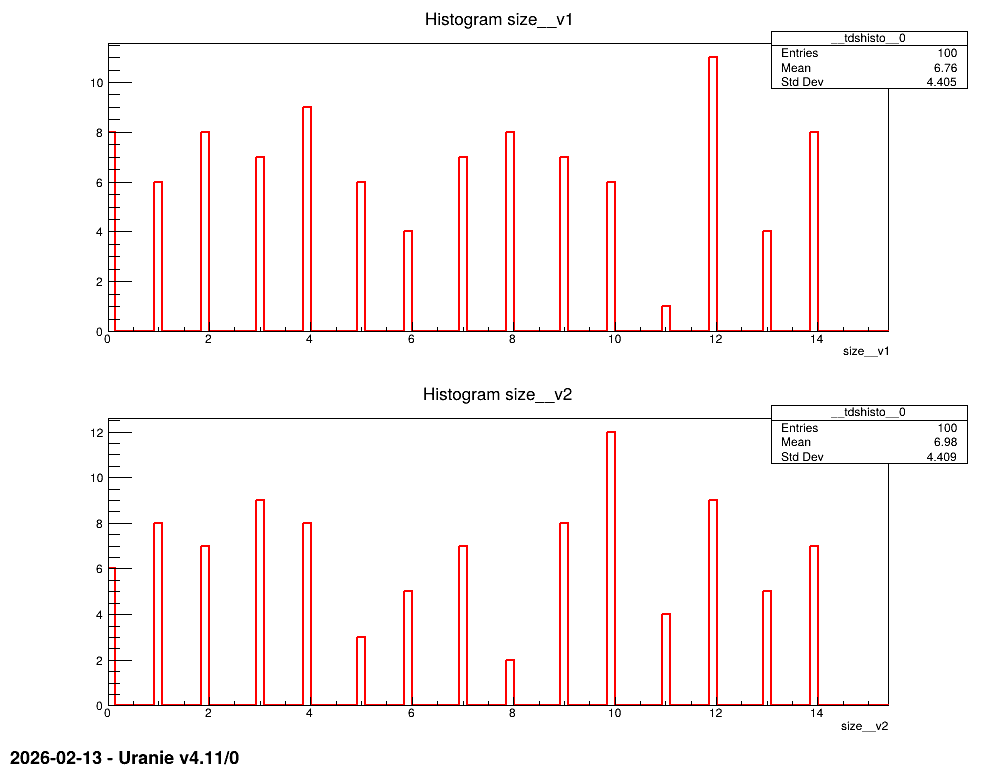
Apart from this, the code is smooth and the final results one can be interested in the size of the vectors produced when empty vectors are allowed. This is produced though the following lines, and the resulting plots are shown in Figure 13.53.
# Produce control plot
Can = ROOT.TCanvas("Can", "Can", 10, 10, 1000, 800)
pad = ROOT.TPad("pad", "pad", 0, 0.03, 1, 1)
pad.Draw()
pad.Divide(1, 2)
pad.cd(1)
tds.getTuple().SetLineColor(2)
tds.getTuple().SetLineWidth(2)
tds.Draw("size__v1")
pad.cd(2)
tds.Draw("size__v2")
If the output file was not properly formatted, then one can have issues with this specific case (empty vectors). The consequences are shown in Macro “relauncherCodeMultiTypeKeyEmptyVectorsAsFailure.py”.
13.8.9.3. Graph
Figure 13.53 Graph of the macro “relauncherCodeMultiTypeKeyEmptyVectors.py”