13.8.7. Macro “relauncherCodeFlowrateSequentialFailure.py”
13.8.7.1. Objective
The goal of this macro is to show how to handle when a code is returning an error status. Up to
version v4.5.0, the input configuration was simply discarded while from any version now, there are
discarded but they can be retrieved and store in a dedicated TDataServer object. The code used
here is the usual flowrate model which has been modified to return a non zero exit status without
producing an output file.
13.8.7.2. Macro
"""
Example of code launching in sequential mode with failure
"""
from URANIE import DataServer, Relauncher
import ROOT
# Create the DataServer.TDataServer
tds = DataServer.TDataServer("foo", "test")
tds.fileDataRead("flowrateUniformDesign.dat")

# Get the attributes
rw = tds.getAttribute("rw")
r = tds.getAttribute("r")
tu = tds.getAttribute("tu")
tl = tds.getAttribute("tl")
hu = tds.getAttribute("hu")
hl = tds.getAttribute("hl")
lvar = tds.getAttribute("l")
kw = tds.getAttribute("kw")

# Create the output attribute
yhat = DataServer.TAttribute("yhat")
d = DataServer.TAttribute("d")

# Set the reference input file and the key for each input attributes
fin = Relauncher.TFlatScript("flowrate_input_with_values_rows.in")
fin.addInput(rw)
fin.addInput(r)
fin.addInput(tu)
fin.addInput(tl)
fin.addInput(hu)
fin.addInput(hl)
fin.addInput(lvar)
fin.addInput(kw)

# The output file of the code
fout = Relauncher.TFlatResult("_output_flowrate_withRow_.dat")
fout.addOutput(yhat)  # Passing the attributes to the output file
fout.addOutput(d)  # Passing the attributes to the output file

# Constructing the code
mycode = Relauncher.TCodeEval("flowrate -s -rf")
mycode.addInputFile(fin)  # Adding the input file
mycode.addOutputFile(fout)  # Adding the output file

# Create the sequential runner
run = Relauncher.TSequentialRun(mycode)
run.startSlave()  # Start the master (necessary even for a sequential)

if run.onMaster():

    lanceur = Relauncher.TLauncher2(tds, run)

    # Store the wrong calculation
    error = DataServer.TDataServer("WrongComputations", "pouet")
    lanceur.setSaveError(error)

    # resolution
    lanceur.solverLoop()
    run.stopSlave()  # Stop the slaves (necessary even for a sequential)

    # dump all wrong configurations
    error.getTuple().SetScanField(-1)
    error.scan("*")

# Draw the result
can = ROOT.TCanvas("pouet", "foo", 1)
tds.Draw("hu:hl")
Here there are very few differences with the one already introduced in
Macro. The first one is obviously the command line which
is called using "-rf" argument, the f being introduced for failure.
mycode = Relauncher.TCodeEval("flowrate -s -rf")
The second difference is the creation of the failure dataserver object in which all wrong
configurations will be stored. Once created, it is simply passed to the launcher object through the
dedicated method setSaveError:
# Store the wrong calculation
error = DataServer.TDataServer("WrongComputations", "pouet")
lanceur.setSaveError(error)
Once done the code is run and two things are looked at: the fact that in a peculiar area of the input
space there are no data anymore (by construction, as shown in
Figure 13.51) and the fact that all configurations are
now stored in a dedicated TDataServer object which one can dump on screen with the command line
below to obtain the second part of the console output seen in
Console
# dump all wrong configurations
error.getTuple().SetScanField(-1)
error.scan("*")
The first part of the console output shown in Console is a perfect illustration of the way the relauncher module is discussion failure: the first part is stating that a non-zero return value has been detected
Command cd ${RUNNINGDIR}/URA_IkSFzC ; flowrate -s -rf has returned non-zero exit code (255).
  If any different from 127 (usually for unknown command) and 139 (usually for SIGSEV), the exit code meaning is "command" dependent.
The second part is letting the user know that no output file has been found (a second reason to consider this configuration as a failure).
Cannot open :: ${RUNNINGDIR}/URA_IkSFzC/_output_flowrate_withRow_.dat
This pattern is repeated every time a configuration is wrong.
13.8.7.3. Graph
Figure 13.51 Representation of the output data point when the code is asked to fail on purpose.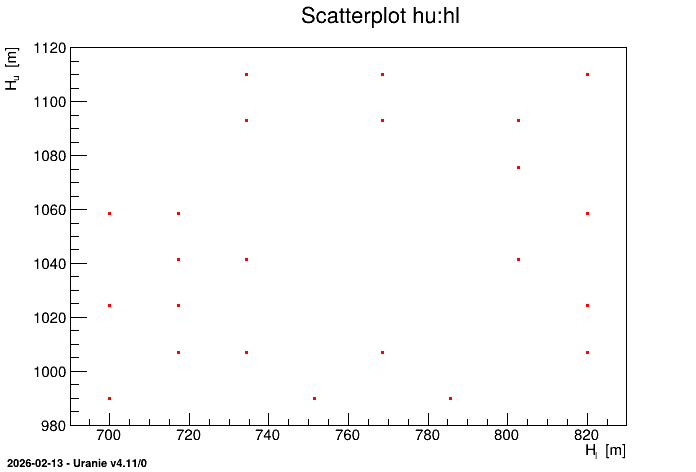
13.8.7.4. Console
--- Uranie v4.11/0 --- Developed with ROOT (6.36.06)
                      Copyright (C) 2013-2026 CEA/DES
                      Contact: support-uranie@cea.fr
                      Date: Thu Feb 12, 2026

Command cd ${RUNNINGDIR}/URA_IkSFzC ; flowrate -s -rf has returned non-zero exit code (255).
  If any different from 127 (usually for unknown command) and 139 (usually for SIGSEV), the exit code meaning is "command" dependent.
Cannot open :: ${RUNNINGDIR}/URA_IkSFzC/_output_flowrate_withRow_.dat
Command cd ${RUNNINGDIR}/URA_IkSFzC ; flowrate -s -rf has returned non-zero exit code (255).
  If any different from 127 (usually for unknown command) and 139 (usually for SIGSEV), the exit code meaning is "command" dependent.
Cannot open :: ${RUNNINGDIR}/URA_IkSFzC/_output_flowrate_withRow_.dat
Command cd ${RUNNINGDIR}/URA_IkSFzC ; flowrate -s -rf has returned non-zero exit code (255).
  If any different from 127 (usually for unknown command) and 139 (usually for SIGSEV), the exit code meaning is "command" dependent.
Cannot open :: ${RUNNINGDIR}/URA_IkSFzC/_output_flowrate_withRow_.dat
Command cd ${RUNNINGDIR}/URA_IkSFzC ; flowrate -s -rf has returned non-zero exit code (255).
  If any different from 127 (usually for unknown command) and 139 (usually for SIGSEV), the exit code meaning is "command" dependent.
Cannot open :: ${RUNNINGDIR}/URA_IkSFzC/_output_flowrate_withRow_.dat
Command cd ${RUNNINGDIR}/URA_IkSFzC ; flowrate -s -rf has returned non-zero exit code (255).
  If any different from 127 (usually for unknown command) and 139 (usually for SIGSEV), the exit code meaning is "command" dependent.
Cannot open :: ${RUNNINGDIR}/URA_IkSFzC/_output_flowrate_withRow_.dat
************************************************************************************************************************************
*    Row   * WrongComp *     rw.rw *       r.r *     tu.tu *     tl.tl *     hu.hu *     hl.hl *       l.l *     kw.kw * ystar.yst *
************************************************************************************************************************************
*        0 *         4 *    0.0633 *       100 *    115600 *     80.73 *   1075.71 *    751.43 *      1600 *  11106.43 *     28.33 *
*        1 *         5 *    0.0633 *  16733.33 *     80580 *     80.73 *   1058.57 *    785.71 *      1680 *     12045 *      24.6 *
*        2 *         8 *    0.0767 *       100 *    115600 *     80.73 *   1075.71 *    751.43 *      1520 *  10793.57 *     42.44 *
*        3 *        12 *      0.09 *  16733.33 *     63070 *       116 *   1075.71 *    751.43 *      1120 *  11419.29 *     83.77 *
*        4 *        23 *    0.1233 *  16733.33 *     63070 *      63.1 *   1041.43 *    785.71 *      1680 *     12045 *     86.73 *
************************************************************************************************************************************