13.8.2. Macro “relauncherFunctionFlowratePython.py”
13.8.2.1. Objective
The goal of this macro is to show how to handle the Python-written function in a full python-script.
This function has been presented, at least its equation
(see Equation 4.1) and would be interface through the
TPythonEval class in the Relauncher module.
13.8.2.2. Macro
"""
Example of python function launching
"""
import math
from URANIE import DataServer, Relauncher
import ROOT

def flowrate_model(drw, drvar, dtu, dtl, dhu, dhl, dlvar, dkw):
    """Simple flowrate model python function."""
    dnum = 2.0 * math.pi * dtu * (dhu - dhl)
    dlnronrw = math.log(drvar / drw)
    dden = dlnronrw * (1.0 + (2.0 * dlvar * dtu) / (dlnronrw * drw * drw * dkw)
                       + dtu / dtl)

    return [dnum / dden, ]


# Create the TDataServer
tds = DataServer.TDataServer("foo", "test")
tds.fileDataRead("flowrateUniformDesign.dat")

# Get the attributes
rw = tds.getAttribute("rw")
r = tds.getAttribute("r")
tu = tds.getAttribute("tu")
tl = tds.getAttribute("tl")
hu = tds.getAttribute("hu")
hl = tds.getAttribute("hl")
lvar = tds.getAttribute("l")
kw = tds.getAttribute("kw")

# Create the output attribute
yhat = DataServer.TAttribute("yhat")

# Constructing the code
mycode = Relauncher.TPythonEval(flowrate_model)
# Adding the input file
mycode.addInput(rw)
mycode.addInput(r)
mycode.addInput(tu)
mycode.addInput(tl)
mycode.addInput(hu)
mycode.addInput(hl)
mycode.addInput(lvar)
mycode.addInput(kw)
# Adding the output file
mycode.addOutput(yhat)

# Create the sequential runner
run = Relauncher.TSequentialRun(mycode)
run.startSlave()  # Start the master (necessary even for a sequential)
if run.onMaster():

    launch = Relauncher.TLauncher2(tds, run)

    # resolution
    launch.solverLoop()
    run.stopSlave()  # Stop the slaves (necessary even for a sequential)

# Draw the result
can = ROOT.TCanvas("pouet", "foo", 1)
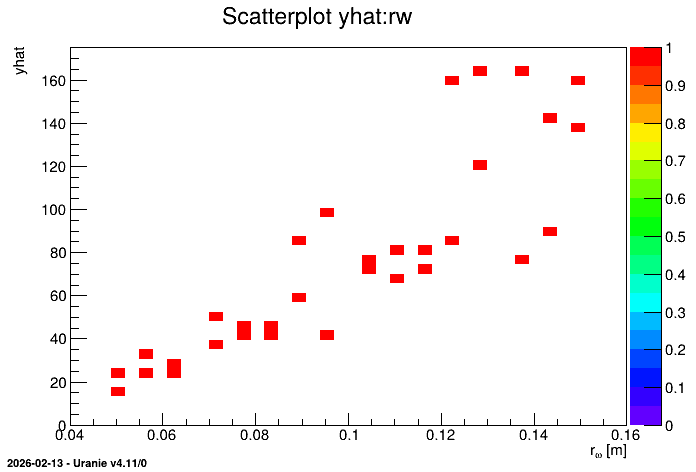
tds.Draw("yhat:rw", "", "colZ")
Obviously the code is now different from the other macros already introduced, but unless some python-specificity, the discussion has been largely done in Macro.
The first interesting part is the definition of the function flowrateModel. It is a classical
python-function, for which every input is either a double, a list (for vectors) or a string.
Disregarding the inner part, where the computation is done, the other interesting part is the return
line: it should always be a list of all the objects that should be returned.
def flowrate_model(drw, drvar, dtu, dtl, dhu, dhl, dlvar, dkw):
    """Simple flowrate model python function."""
    dnum = 2.0 * math.pi * dtu * (dhu - dhl)
    dlnronrw = math.log(drvar / drw)
    dden = dlnronrw * (1.0 + (2.0 * dlvar * dtu) / (dlnronrw * drw * drw * dkw)
                       + dtu / dtl)

    return [dnum / dden, ]
Apart from this, the only other difference is the assessor construction which is an instance of the
TPythonEval class as shown here:
# Constructing the code
mycode = Relauncher.TPythonEval(flowrate_model)
The macro is also leading to the creation of the following plot.
13.8.2.3. Graph
Figure 13.47 Representation of the output as a function of the first input with a colZ option