13.8.8. Macro “relauncherCodeMultiTypeKey.py”
13.8.8.1. Objective
The objective of this macro is to test the case where vectors and strings are produced as outputs, using the code described in Producing outputs, with a Key format, obtained by doing:
multitype -mtKey
The resulting output file, named _output_multitype_mt_Key_.dat looks like:
w1 = nine
v1 = -0.512095
v1 = 0.039669
v1 = -1.3834
v1 = 1.37667
v1 = 0.220672
v1 = 0.633267
v1 = 1.37027
v1 = -0.765636
v2 = 14.1981
v2 = 14.0855
v2 = 10.7848
v2 = 9.45476
v2 = 9.17308
v2 = 6.60804
v2 = 10.0711
v2 = 14.1761
v2 = 10.318
v2 = 12.5095
v2 = 15.6614
v2 = 10.3452
v2 = 9.41101
v2 = 7.47887
f1 = 32.2723
w2 = eight
13.8.8.2. Macro Uranie
"""
Example of multitype code launching
"""
from URANIE import DataServer, Relauncher, Sampler
import ROOT

# Create the DataServer.TDataServer and create the seed attribute
tds = DataServer.TDataServer("foo", "multitype usecase")
tds.addAttribute(DataServer.TUniformDistribution("seed", 0, 100000))

# Create DOE
tsam = Sampler.TSampling(tds, "lhs", 100)
tsam.generateSample()

# Create output attribute pointers
w1 = DataServer.TAttribute("w1", DataServer.TAttribute.kString)
w2 = DataServer.TAttribute("w2", DataServer.TAttribute.kString)
v1 = DataServer.TAttribute("v1", DataServer.TAttribute.kVector)
v2 = DataServer.TAttribute("v2", DataServer.TAttribute.kVector)
f1 = DataServer.TAttribute("f1")

# Create the input files
inputFile = Relauncher.TFlatScript("multitype_input.dat")
inputFile.addInput(tds.getAttribute("seed"))

# Create the output files
outputFile = Relauncher.TKeyResult("_output_multitype_mt_Key_.dat")
outputFile.addOutput(w1, "w1")
outputFile.addOutput(v1, "v1")
outputFile.addOutput(v2, "v2")
outputFile.addOutput(f1, "f1")
outputFile.addOutput(w2, "w2")

# Create the user's evaluation function
myeval = Relauncher.TCodeEval("multitype -mtKey")
myeval.addInputFile(inputFile)  # Add the input file
myeval.addOutputFile(outputFile)  # Add the output file

# Create the runner
runner = Relauncher.TSequentialRun(myeval)

# Start the slaves
runner.startSlave()
if runner.onMaster():

    # Create the launcher
    lanceur = Relauncher.TLauncher2(tds, runner)
    lanceur.solverLoop()

    # Stop the slave processes
    runner.stopSlave()

# Produce control plot
Can = ROOT.TCanvas("Can", "Can", 10, 10, 1000, 800)
pad = ROOT.TPad("pad", "pad", 0, 0.03, 1, 1)
pad.Draw()
pad.cd()
tds.drawPairs("w1:v1:v2:f1:w2")
The beginning of the code is pretty common to many other macros: creating a dataserver and input attributes (here the only one is the seed, needed for the random generator to produce vectors and strings). A sampling object is created as well to produce a 100-points design-of-experiments and the output attributes are created, as such:
# Create output attribute pointers
w1 = DataServer.TAttribute("w1", DataServer.TAttribute.kString)
w2 = DataServer.TAttribute("w2", DataServer.TAttribute.kString)
v1 = DataServer.TAttribute("v1", DataServer.TAttribute.kVector)
v2 = DataServer.TAttribute("v2", DataServer.TAttribute.kVector)
f1 = DataServer.TAttribute("f1")
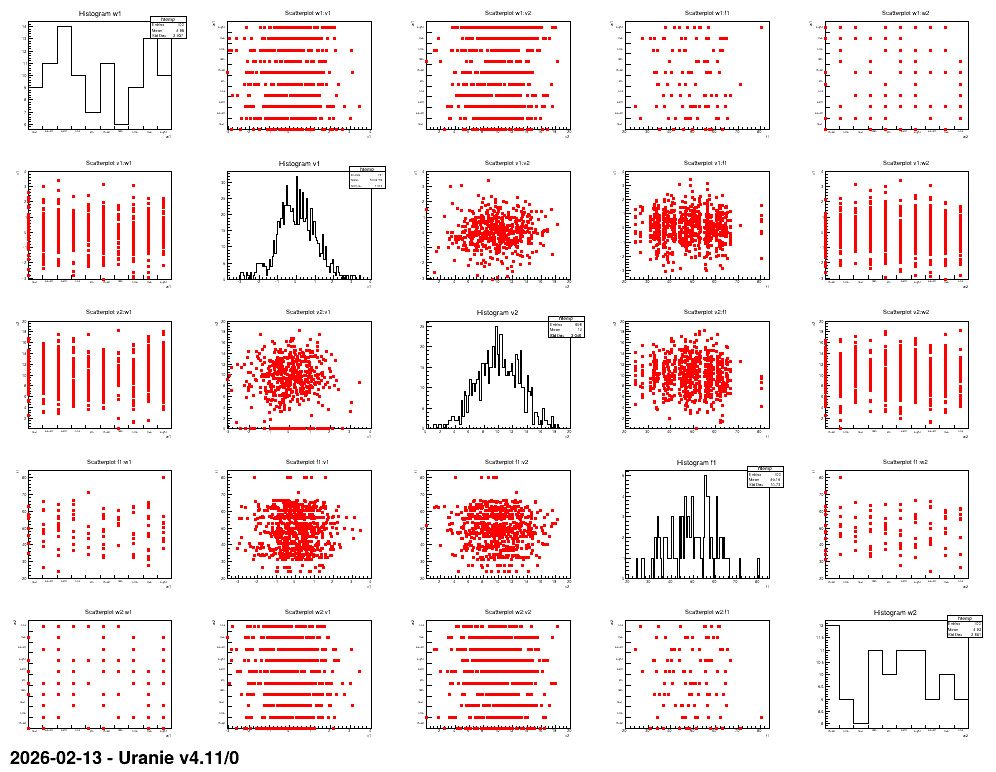
This is where the specificity of the vector and string is precised. It will be passed on to the rest of the code automatically. The rest is common to many relauncher job (for instance Macro “relauncherCodeFlowrateSequential.py”) with the only difference being that the output file is a key type one. It results in the following plots.
13.8.8.3. Graph
Figure 13.52 Graph of the macro “relauncherCodeMultiTypeKey.py”