13.5.11. Macro “sensitivityRegressionLeveLE.C”
Warning
The levele command will be installed on your machine only if a Fortran compiler is found
13.5.11.1. Objective
The objective of this macro is to perform a SRC and SRRC measurement on the temporal use-case levele.
This use-case is an example of code that takes a dozen of entries in order to compute the evolution
of dose as a function of time. The result of every computation consists in 3 vectors: the time (always
the same value disregarding all entries), the dose called “y” and a third useless information.
13.5.11.2. Macro Uranie
    //Create DataServer and add input attributes
    TDataServer *tds = new URANIE::DataServer::TDataServer("tds", "levelE usecase");

    tds->addAttribute( new TUniformDistribution("t", 100, 1000));
    tds->addAttribute( new TLogUniformDistribution("kl", 0.001, .01));
    tds->addAttribute( new TLogUniformDistribution("kc", 1.0e-6, 1.0e-5));
    tds->addAttribute( new TLogUniformDistribution("v1", 1.0e-3, 1.0e-1));
    tds->addAttribute( new TUniformDistribution("l1", 100., 500.));
    tds->addAttribute( new TUniformDistribution("r1", 1., 5.));
    tds->addAttribute( new TUniformDistribution("rc1", 3., 30.));
    tds->addAttribute( new TLogUniformDistribution("v2", 1.0e-2, 1.0e-1));
    tds->addAttribute( new TUniformDistribution("l2", 50., 200.));
    tds->addAttribute( new TUniformDistribution("r2", 1., 5.));
    tds->addAttribute( new TUniformDistribution("rc2", 3., 30.));
    tds->addAttribute( new TLogUniformDistribution("w", 1.0e5, 1.0e7));

    //Tell the code where to find attribute value in input file
    TString sIn = "levelE_input_with_values_rows.in";
    tds->getAttribute("t")->setFileKey(sIn, "", "%e",TAttributeFileKey::kNewRow);
    tds->getAttribute("kl")->setFileKey(sIn,"", "%e",TAttributeFileKey::kNewRow);
    tds->getAttribute("kc")->setFileKey(sIn, "", "%e",TAttributeFileKey::kNewRow);
    tds->getAttribute("v1")->setFileKey(sIn, "", "%e",TAttributeFileKey::kNewRow);
    tds->getAttribute("l1")->setFileKey(sIn, "", "%e",TAttributeFileKey::kNewRow);
    tds->getAttribute("r1")->setFileKey(sIn, "", "%e",TAttributeFileKey::kNewRow);
    tds->getAttribute("rc1")->setFileKey(sIn, "", "%e",TAttributeFileKey::kNewRow);
    tds->getAttribute("v2")->setFileKey(sIn, "", "%e",TAttributeFileKey::kNewRow);
    tds->getAttribute("l2")->setFileKey(sIn, "", "%e",TAttributeFileKey::kNewRow);
    tds->getAttribute("r2")->setFileKey(sIn, "", "%e",TAttributeFileKey::kNewRow);
    tds->getAttribute("rc2")->setFileKey(sIn, "", "%e",TAttributeFileKey::kNewRow);
    tds->getAttribute("w")->setFileKey(sIn, "", "%e",TAttributeFileKey::kNewRow);

    // Create DOE
    Int_t ns = 1024;
    TSampling *samp = new TSampling(tds, "lhs", ns);
    samp->generateSample();

    //How to read ouput files
    TOutputFileRow *out = new TOutputFileRow("_output_levelE_withRow_.dat");
    //Tell the output file that attribute IS a vector and is SECOND column
    out->addAttribute(new TAttribute("y", TAttribute::kVector), 2 );

    //Creation of TCode
    TCode *myc = new TCode(tds," levele 2> /dev/null");
    myc->addOutputFile(out);

    //Run the code
    TLauncher * tl = new TLauncher(tds, myc);
    tl->run(runOpt.data()); // runOpt = "" or "nointermed"

    //Launch Regression
    TRegression *tsen = new TRegression(tds, "t:kl:kc:v1:l1:r1:rc1:v2:l2:r2:rc2:w" , "y", "SRCSRRC");
    tsen->computeIndexes();
    TTree *res=tsen->getResultTuple();

    //Plotting mess
    double tps[26]={20000,30000,40000,50000,60000,70000,80000,90000,100000, 200000,300000,400000,500000,600000,700000,800000,900000, 1e+06,2e+06,3e+06,4e+06,5e+06,6e+06,7e+06,8e+06,9e+06};
    int colors[12] ={1,2,3,4,6,7,8,15,30,38,41,46};

    TCanvas *c2 = new TCanvas("c2","c2",5,64,1600,500);
    TPad *pad = new TPad("pad","pad",0, 0.03, 1, 1); pad->Draw();
    pad->Divide(3,1); pad->cd(1);
    gPad->SetLogx(); gPad->SetGrid();
    TMultiGraph *mg = new TMultiGraph();
    res->Draw("Value","Inp==\"__R2__\" && Order==\"Total\" && Method==\"SRRC^2\"","goff");
    double *data3=res->GetV1();

    TGraph *gr3 = new TGraph(26,tps,data3); gr3->SetMarkerColor(2); gr3->SetLineColor(2); gr3->SetMarkerStyle(23);
    mg->Add(gr3);
    res->Draw("Value","Inp==\"__R2__\" && Order==\"Total\" && Method==\"SRC^2\"","goff");
    double *data4=res->GetV1();

    TGraph *gr4 = new TGraph(26,tps,data4); gr4->SetMarkerColor(4); gr4->SetLineColor(4); gr4->SetMarkerStyle(23);
    mg->Add(gr4);
    mg->Draw("APC");
    mg->GetXaxis()->SetTitle("Time");
    mg->GetYaxis()->SetTitle("#sum Sobol");
    mg->GetYaxis()->SetRangeUser(0.0,1.0);

    //Legend
    gStyle->SetLegendBorderSize(0);
    gStyle->SetFillStyle(0);

    TLegend *lg = new TLegend(0.25,0.7,0.45,0.9);
    lg->AddEntry(gr4,"R2 SRC","lp");
    lg->AddEntry(gr3,"R2 SRRC","lp");
    lg->Draw();


    pad->cd(2);  gPad->SetLogx();  gPad->SetGrid();
    TMultiGraph *mg2 = new TMultiGraph();

    string names[12] = {"t","kl","kc","v1","l1","r1","rc1","v2","l2","r2","rc2","w"};
    TGraph *src[12];
    TLegend *leg = new TLegend(0.25,0.3,0.45,0.89,"Cumulative contributions");
    leg->SetTextSize(0.035);
    for(unsigned int igr=0; igr<12; igr++)
    {
        string sel="Inp==\""+names[igr]+"\" && Order==\"Total\" && Method==\"SRC^2\" && Algo!=\"--rho^2--\"";
        res->Draw("Value", sel.c_str(),"goff");
        double *data=res->GetV1();
        src[igr] = new TGraph();
        src[igr]->SetMarkerColor(colors[igr]); src[igr]->SetLineColor(colors[igr]);  src[igr]->SetFillColor(colors[igr]);

        src[igr]->SetPoint(0, 0.99999999*tps[0], 0);
        for(unsigned int ip=0; ip<26; ip++)
        {
            double x=0, y=0;
            if(igr!=0)
                src[igr-1]->GetPoint(ip+1,x,y);
            src[igr]->SetPoint(ip+1, tps[ip], y+data[ip]);
        }
        src[igr]->SetPoint(27, tps[25]*1.000000001, 0);
        leg->AddEntry(src[igr],names[igr].c_str(),"f");
    }

    for(int igr2=11; igr2>-1; igr2--)
        mg2->Add(src[igr2]);

    mg2->Draw("AFL");
    mg2->GetXaxis()->SetTitle("Time");
    mg2->GetYaxis()->SetTitle("SRC^{2}");
    mg2->GetYaxis()->SetRangeUser(0.0,0.3);
    leg->Draw();

    pad->cd(3); gPad->SetLogx(); gPad->SetGrid();
    TMultiGraph *mg3 = new TMultiGraph();
    TGraph *srrc[12];
    for(unsigned int igr=0; igr<12; igr++)
    {
        string sel="Inp==\""+names[igr]+"\" && Order==\"Total\" && Method==\"SRRC^2\" && Algo!=\"--rho^2--\"";
        res->Draw("Value", sel.c_str(),"goff");
        double *data=res->GetV1();
        srrc[igr] = new TGraph();
        srrc[igr]->SetMarkerColor(colors[igr]); srrc[igr]->SetLineColor(colors[igr]);  srrc[igr]->SetFillColor(colors[igr]);

        srrc[igr]->SetPoint(0, 0.99999999*tps[0], 0);
        for(unsigned int ip=0; ip<26; ip++)
        {
            double x=0, y=0;
            if(igr!=0)
                srrc[igr-1]->GetPoint(ip+1,x,y);
            srrc[igr]->SetPoint(ip+1, tps[ip], y+data[ip]);
        }
        srrc[igr]->SetPoint(27, tps[25]*1.000000001, 0);
        srrc[igr]->SetTitle( names[igr].c_str() );
    }

    for(int igr2=11; igr2>-1; igr2--)
        mg3->Add(srrc[igr2]);

    //  mg3->Draw("a fb l3d");
    mg3->Draw("AFL");
    mg3->GetXaxis()->SetTitle("Time");
    mg3->GetYaxis()->SetTitle("SRRC^{2}");
    mg3->GetYaxis()->SetRangeUser(0.0,1.0);
    leg->Draw();
The levele external code is located in the bin directory of the Uranie installation.
When looking at the code and comparing it to an usual Regression estimation, the organisation is completely transparent. The only noticeable (and compulsory) thing to do is to change the default type of the attribute read at the end of the job. This is done in this line:
out->addAttribute(new TAttribute("y", TAttribute::kVector), 2 );
where the output attribute is provided, changing its nature to a vector, thanks to the second argument
of the TAttribute constructor from the default (kReal) to the desired nature (kVector). Once
this is done, this information is broadcast internally to the code that knows how to deal with this
type of attribute.
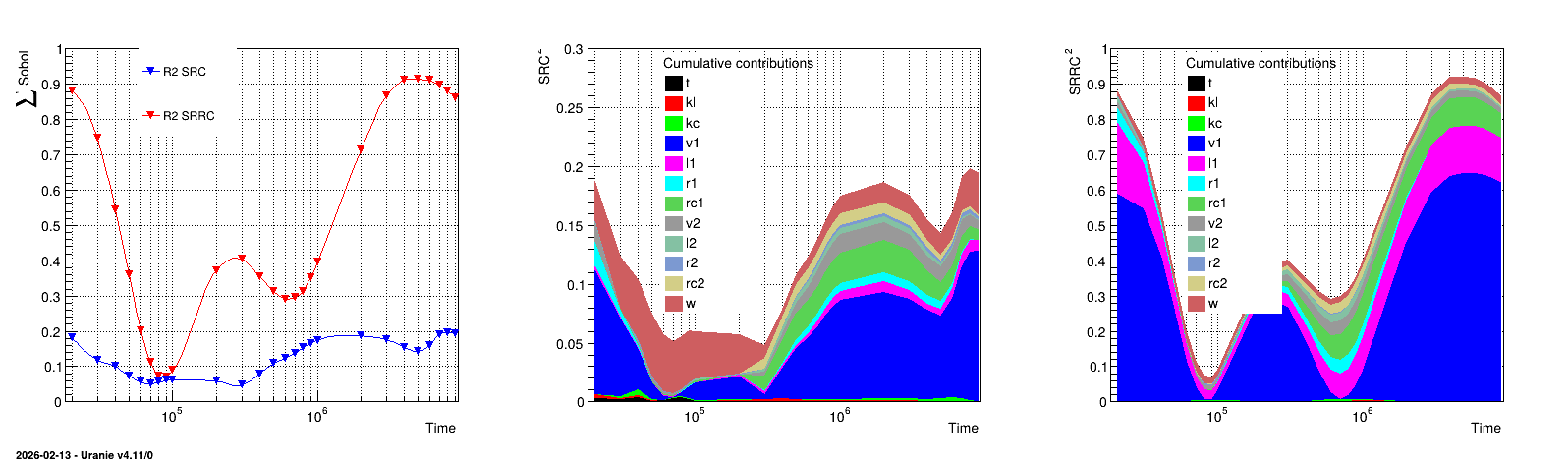
The rest of the code is the graphical part, leading to the figure below (it is provided to illustrate how to represent results).
13.5.11.3. Graph
The results of the previous macro is shown in Figure 13.27, where the left panel represents the value of the \(R^2\) coefficients both the SRC and SRRC coefficients estimation. The middle and right panel display the cumulative sum of the quadratic value of the coefficient respectively for the SRC and SRRC case.
Figure 13.27 Graph of the macro “sensitivityRegressionLeveLE.C”